
ACE Money Transfer
ACE Money Transfer
01 Jun 2026
Starling Bank has redefined what a UK current account can look like — instant notifications, a beautifully simple app, and full banking functionality without a single branch. But even the most modern digital bank still connects to the same international payment infrastructure that has existed for decades. If you need to receive money from abroad into your Starling account, the Starling Bank SWIFT Codes are the one piece of information that makes it possible. This guide covers everything — the exact codes, what each character means, how Starling handles international transfers, and exactly where to find your details when you need them.
A SWIFT code — also known as a BIC, standing for Bank Identifier Code — is a globally standardised identifier used in the Society for Worldwide Interbank Financial Telecommunication. This network helps banks and financial institutions communicate in a secure way, enabling messages and payments to move between institutions worldwide. Starling Bank has grown from just 356,000 accounts in 2018 to over 4.6 million open accounts by 2025— with total customer deposits hitting a record £12.5 billion.
Starling Bank Limited is a fully authorised and regulated UK bank, supervised by both the Financial Conduct Authority (FCA) and the Prudential Regulation Authority (PRA). Founded in 2016 and branchless from day one, Starling operates entirely through its app and online platform. Despite its digital-first nature, Starling is a full participant in the international SWIFT network. Anyone sending money to a Starling account from outside the UK needs the correct SWIFT code to ensure the transfer reaches Starling’s systems — and ultimately the right account — without delay.
The primary SWIFT code for Starling Bank Limited in the United Kingdom is:
SRLGGB2LXXX
This is the head office SWIFT code registered to Starling Bank’s London address at Floor 5, London Fruit and Wool Exchange, 1 Duval Square, London, which serves as Starling’s primary office for international payment processing. It is the standard code used for receiving international wire transfers into a UK Starling personal or business account.
Starling Bank also uses a second SWIFT code for euro account transactions. Always confirm which code applies to your specific transfer through the Starling app before sharing it with a sender.
Starling Bank has more than one SWIFT code registered for use in the United Kingdom, reflecting its different currency account offerings:
| SWIFT Code | Bank / Location | Description |
|---|---|---|
| SRLGGB2LXXX | Starling Bank, Floor 5, London Fruit and Wool Exchange, 1 Duval Square, London | Primary SWIFT code used for GBP (British Pound) transfers. This is the standard code for receiving international payments into a Starling current account, including currency conversions into GBP. |
| SRLGGB3LXXX | Starling Bank, London | Secondary SWIFT code used specifically for euro account transactions. The “3L” location code applies to EUR-denominated accounts receiving international transfers in euros. |
| SRLGGB2LSPS | Starling Bank, Floor 3, London | Branch-specific operational SWIFT code used internally for certain services. It is not typically required for standard personal or business international transfers. |
For the vast majority of Starling personal and business account customers receiving international wire transfers in GBP, SRLGGB2LXXX is the correct code. For euro transfers into a Starling euro account, use SRLGGB3LXXX. Because it is important to use the correct code, always double-check that the SWIFT/BIC code and IBAN match your GBP or EUR account setup before sharing any details with a sender.
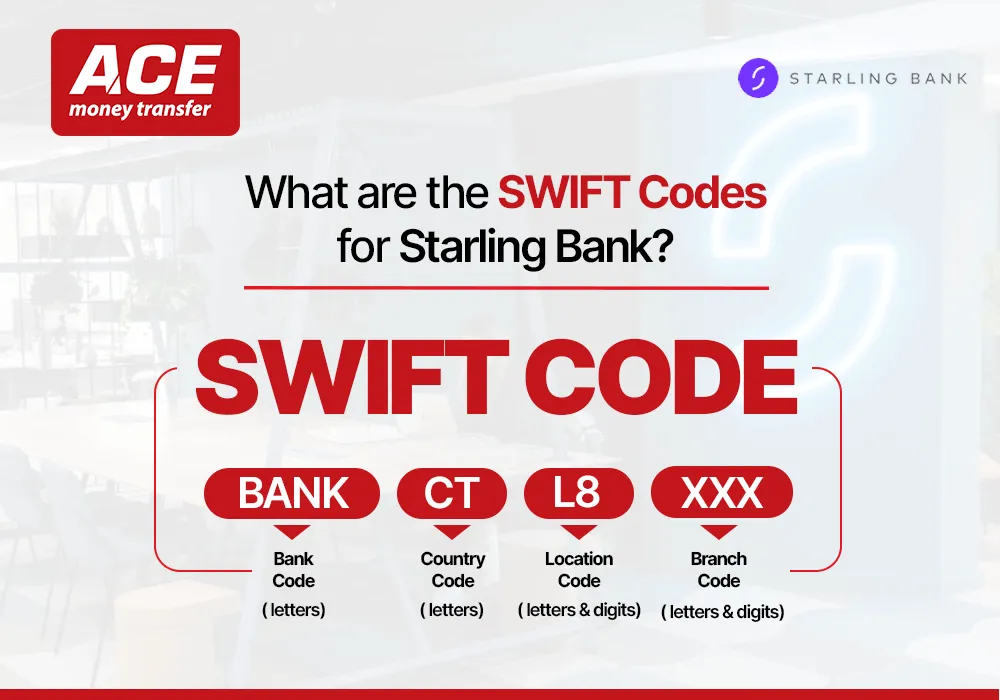
Starling Bank has directly published a clear explanation of its own SWIFT code structure. Breaking down SRLGGB2LXXX:
| Code Segment | Meaning | Explanation |
|---|---|---|
| SRLG | Bank code | The first four characters identify Starling Bank. SRLG is the standard SWIFT abbreviation representing Starling Bank Limited, derived from its registered name. |
| GB | Country code | These two letters represent the United Kingdom, where Starling Bank is incorporated, regulated, and operates. |
| 2L | Location code | Indicates the bank’s registered SWIFT location in London for GBP accounts. For euro accounts, the location code changes to 3L, forming SRLGGB3L. |
| XXX | Branch code | Denotes the primary/head office. Since Starling Bank is fully branchless, the XXX suffix confirms all accounts are linked to a centralised entity rather than physical branches. |
All SWIFT codes are either 8 or 11 characters in total. An 8-character code or one ending in XXX refers to the head office. A full 11-character code with a unique 3-digit suffix identifies a specific branch or operational unit.
Before sending from an international bank or transfer provider, the sender should confirm the correct bank details for the recipient and will typically need the following information:
• Bank name: Starling Bank Limited
• SWIFT/BIC code: SRLGGB2LXXX (for GBP transfers) or SRLGGB3LXXX (for euro transfers)
• Bank address: Floor 5, London Fruit and Wool Exchange, 1 Duval Square, London, E1 6AW, United Kingdom
• Your IBAN: Your personal Starling IBAN — find this in the Starling app under the top right menu, Account Details, then International
• Your sort code: All Starling Bank customers share the sort code 608371
• Your account number: Your individual 8-digit account number
For transfers originating from Europe or any country where IBAN is the standard, always provide both your IBAN and the correct Starling Bank SWIFT Codes. The SWIFT code directs the payment to Starling Bank as the receiving institution, while the IBAN identifies your specific account. Using the correct bank information, including the SWIFT code and IBAN, is important so the recipient receives the transfer correctly.
When sending or receiving money between banks within the United Kingdom, the SWIFT system is not involved at all. Instead, domestic payments are handled through Faster Payments, BACS, or CHAPS, which rely on sort codes and account numbers rather than international routing codes.
All Starling Bank accounts use the shared sort code 608371, combined with your unique 8-digit account number to process UK transfers. If someone in the UK is paying you, they only need these details — the sort code and account number are sufficient. A SWIFT code is unnecessary for domestic transactions and will not be used in routing UK-to-UK payments.
For incoming international transfers, payments are processed through the global SWIFT network, enabling secure international bank transfers to Starling accounts. In this case, the sending bank uses SRLGGB2LXXX (part of the Starling Bank SWIFT Codes) to identify Starling Bank within the international banking system. The payment may pass through intermediary banks before reaching Starling, which then allocates the funds to your account using your IBAN and internal account details. Starling Bank customers transacted £174 billion in 2023 — a 21% year-on-year increase — with £19.9 billion spent through Starling cards alone, reflecting the scale of financial activity flowing through its SWIFT-connected infrastructure.
A key advantage of banking with Starling is its simplified, centralised structure. Because there are no physical branches and all accounts are managed under a single banking entity, there is no need to worry about branch-specific identifiers. For most international transfers, using SRLGGB2LXXX along with your IBAN is enough to ensure smooth and accurate processing, though the sender should verify the recipient’s Starling details before the funds are allocated.
You need the Starling SWIFT code in these situations:
• Overseas salary payments: If your employer is outside the UK, they must use SRLGGB2LXXX (Starling Bank SWIFT Codes) along with your IBAN to send your salary to your Starling Bank account.
• Money from family or friends abroad: Before submitting the transfer, the sender should confirm the correct bank details for the recipient, including the Starling SWIFT code, so funds reach you without errors or delays.
• Freelance or client payments: International clients and platforms require the SWIFT code to process cross-border payments for services, contracts, or remote work income.
• International remittances: Money transfer services use the SWIFT code to identify Starling Bank as the receiving bank for inbound transfers.
• Euro account transfers: For EUR payments into a Starling euro account, use SRLGGB3LXXX instead of SRLGGB2LXXX, as using the correct code is important to help prevent processing delays.
European countries use IBAN as the standard account identifier for international transfers. Starling Bank accounts come with a full UK IBAN following the standard format: GB followed by two check digits, then SRLG (Starling's bank code), then the sort code 608371, then your 8-digit account number. The structure looks like GBxxSRLG608371xxxxxxxx. For transfers from Europe, you will need both your Starling IBAN and the SWIFT code. Neither alone is sufficient for a complete European wire transfer.
Routing numbers are nine-digit codes used exclusively within the United States domestic payment system. They have no relevance to international transfers leaving the US and arriving in the UK. If someone in the US is sending a wire transfer to your Starling account, they need your Starling IBAN and SRLGGB2LXXX. Routing numbers are US-specific and do not function outside the US banking infrastructure.
IFSC codes identify specific bank branches within India's domestic payment network for NEFT, RTGS, and IMPS transfers. They operate exclusively within India and have no function in international cross-border transfers. If someone in India is sending an international wire to your Starling account, they need the Starling SWIFT code SRLGGB2LXXX — not any IFSC code. IFSC codes are irrelevant for transfers leaving the Indian banking system and arriving in the UK.
Starling Bank makes finding your international account details straightforward through the app:
• Starling app (best option): Open the app ? Menu (top right) ? Account Details ? International. In Starling’s online banking app/account area, you can view your IBAN, SWIFT code, and full transfer info.
• Bank statements: Available in the app; include IBAN, sort code, and sometimes SWIFT details under international payments.
• Official website: Check Starling Bank help pages at starlingbank.com for verified IBAN/SWIFT structure.
• In-app support chat: Contact Starling support via chat to confirm the correct bank details for your specific transfer and recipient setup.
| Common Error | Solution |
|---|---|
| Using the wrong SWIFT code for GBP vs EUR transfers | SRLGGB2LXXX is for GBP accounts, while SRLGGB3LXXX is for euro accounts. It’s important that the correct SWIFT/BIC and IBAN match the GBP or EUR account type, so double-check the details to avoid delays. |
| Using SWIFT for UK domestic transfers | SWIFT codes are only for international payments. For UK transfers into Starling Bank, use sort code 608371 and your account number instead. |
| Adding spaces in the SWIFT code | Enter the SWIFT code as a single continuous string (e.g., SRLGGB2LXXX). Spaces can cause payment rejection or processing errors. |
| Missing IBAN when sending internationally | Always provide both IBAN and SWIFT code together, as the SWIFT code alone cannot identify your specific account. |
| Using unverified third-party SWIFT codes | Always check the official Starling app (Account Details ? International) or contact support, as only Starling can confirm the correct bank details for the intended recipient or transfer setup. |
Yes, completely. The SWIFT system is a secure messaging network, and your SWIFT code is public information — it identifies Starling Bank Limited as an institution, not your personal account or access credentials. Sharing it with anyone carries no financial risk.
Your IBAN and account number are also safe to share for receiving money. They allow someone to send funds to your account at Starling Bank but cannot be used to access it, authorise withdrawals, or view any personal financial information related to the Starling Bank SWIFT Codes system. According to global banking data, cross-border payments are expected to exceed $250 trillion annually by 2027, driven by rising digital banking and remittance flows.
What you should never share under any circumstances includes your Starling app login details, your card PIN, one-time passcodes sent to your phone, or your full card number together with the expiry date and CVV. Starling will never ask for any of these through an unsolicited call, email, or message. Any such request is a fraud attempt — report it through the in-app support channel immediately.
The primary SWIFT code for Starling Bank Limited is SRLGGB2LXXX. SWIFT stands for Society for Worldwide Interbank Financial Telecommunication. This is registered to Starling’s London head office and is used for receiving international wire transfers into UK GBP Starling accounts.
Yes. Starling uses SRLGGB3LXXX for euro account transactions. The location code changes from 2L to 3L for euro transfers. Always check which account you are receiving into and confirm the correct code through the Starling app.
Open the Starling app and, through its online banking interface, tap the top right menu, select Account Details, then tap International. Your IBAN and SWIFT code are displayed here alongside all other details needed for receiving international transfers.
Yes. The SWIFT code identifies Starling Bank as the receiving institution. Your IBAN identifies your specific account within Starling. Both are required for a complete and accurate international transfer.
Most international wire transfers arrive within one to five business days. The exact timing depends on the sending country, currencies involved, and whether the payment passes through correspondent banks. Transfers sent during UK business hours on weekdays typically process most efficiently.
Global remittances to low- and middle-income countries reached over $860 billion in recent years, highlighting the importance of reliable SWIFT-based transfer systems for international money flow. Whether you are receiving a salary from an overseas employer, collecting fees from an international client, or accepting money from family living abroad, the Starling Bank SWIFT Codes — SRLGGB2LXXX for GBP transfers and SRLGGB3LXXX for euro transfers — help send GBP or EUR to the right Starling account when the sender uses the matching details. Pair them with your personal Starling IBAN, which you can find in seconds inside the app, and you give anyone in the world everything they need to transfer funds directly to your Starling account.
If you need to send money abroad quickly and without complications, ACE Money Transfer offers a simple and reliable solution. It provides strong exchange rates, supports direct transfers to bank accounts in many countries, and lets you track your payment in real time, though users who want to send GBP to Starling should still use the correct Starling account details and SWIFT information provided in the app. The service is designed to be fully transparent, ensuring you always know the exact fees upfront with no unexpected charges later. Want a simple way to understand international transfers in detail? Explore our complete guide to using ACE here.